



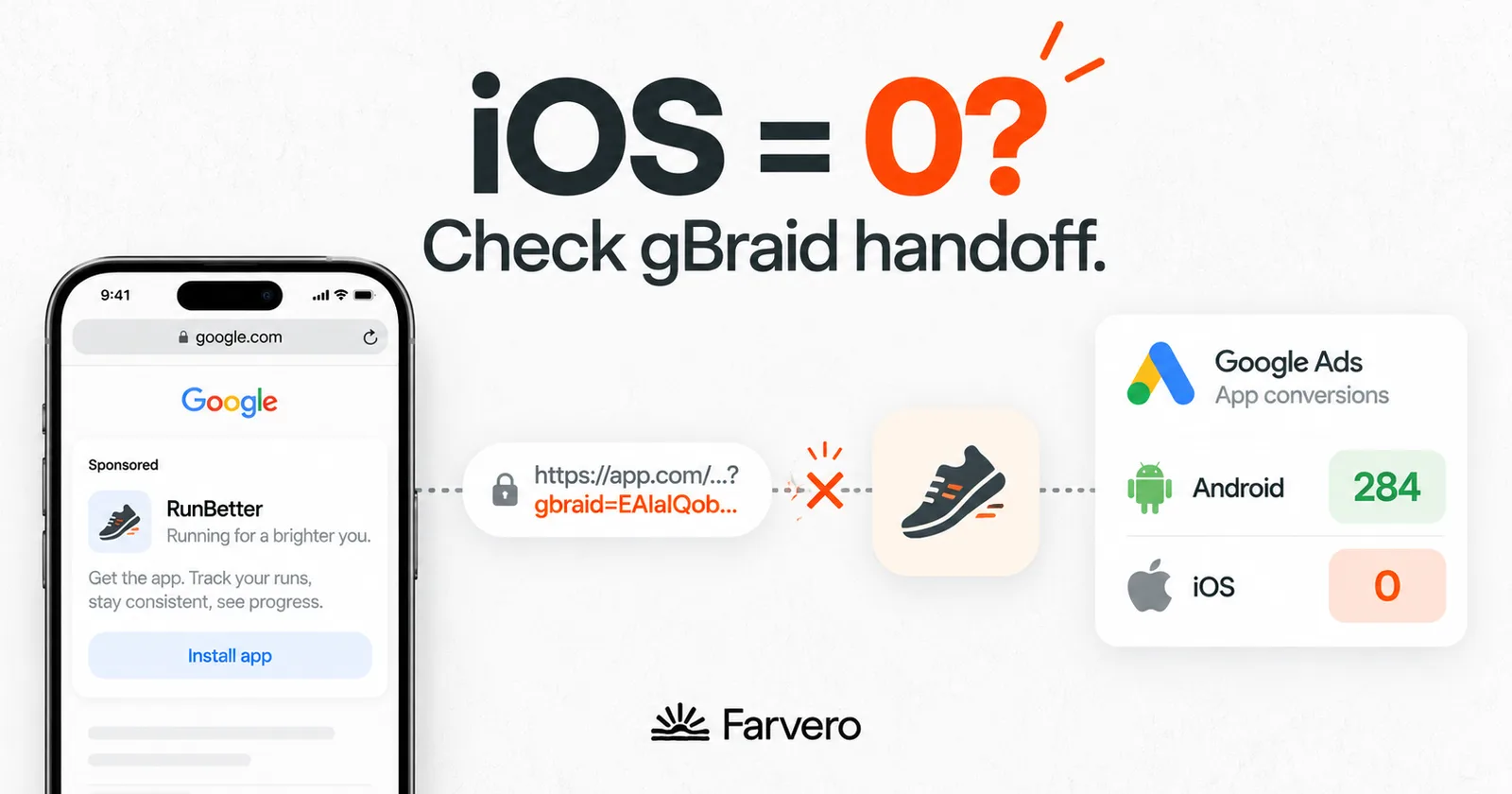
If your Google Ads account shows healthy Android app conversions while iOS reads zero, and the diagnostics say “Your gBraid conversion measurement setup is incorrect,” your data is probably fine. Your attribution is not. iOS ad clicks carry a gbraid parameter instead of a GCLID, and if your app never hands that parameter to its measurement SDKs, every iOS conversion goes uncredited.
I hit exactly this on a Swiss booking marketplace I run measurement for. The app’s MMP showed iOS driving more than three times the in-app purchases Android did. Google Ads attributed one single iOS conversion, against twenty on Android. Same campaigns, same app, same weeks. iOS was quietly outperforming Android everywhere except in the report that decides budgets.
This is part three of the app-tracking series (part one: the dual-stack architecture, part two: silent revenue failures). It is the most specific of the three, deliberately: this failure has a precise symptom, a precise cause, and a precise fix, and almost nothing written about it covers the app side.
TL;DR
- Symptom: Android app conversions attribute normally, iOS conversion actions read zero or “Needs attention,” and Google Ads diagnostics report an incorrect gBraid setup, often for both your Firebase and MMP conversion actions.
- Cause: since ATT, iOS web-to-app ad clicks are measured with gbraid/wbraid instead of GCLID. The parameter travels on the click URL. If your app does not explicitly hand the opening URL to Firebase, the parameter is never captured, and iOS conversions cannot be matched to campaigns.
- The primary fix is one call:
Analytics.handleOpen(url)in every iOS URL-open entry point (SwiftUI.onOpenURL, UIScene delegate methods, Universal Link handlers), on Firebase iOS SDK 6.32.2 or newer. - Supporting requirements: Universal Links with an intact query string end to end, auto-tagging on, and your MMP’s web-to-app gbraid forwarding enabled as the secondary path.
- Recovery is gradual, not instant: gbraid capture only exists in updated app builds, so attribution recovers as users update. Plan a one-to-two-week validation window.
First, confirm it is an attribution gap, not data loss
Before touching code, establish that the conversions exist. Open your MMP or Firebase and compare iOS and Android in-app purchase events for the same period. In our case the picture was unambiguous: iOS fired over three times Android’s purchase volume, with revenue flowing correctly, while the Google Ads channel view credited iOS with a single conversion.
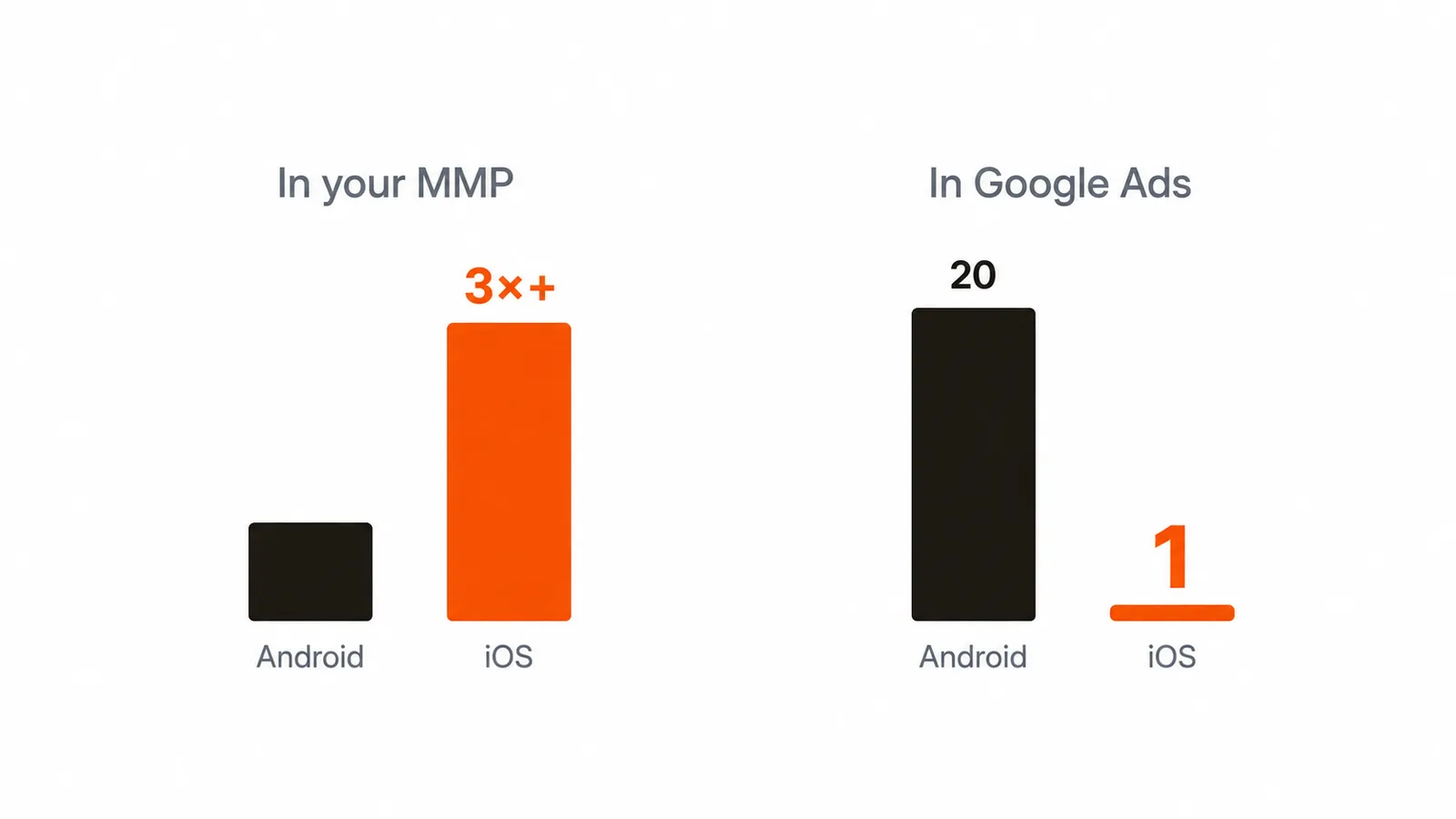
That distinction changes everything about the fix. The events are firing, values are attached, users are converting. The only broken link is the match between an iOS ad click and the eventual in-app conversion. Do not let anyone rebuild event tracking to solve an attribution problem.
Also check the timeline: our last recorded iOS conversion in Google Ads was three weeks stale. If yours coincides with an app release or an SDK update, that is your regression point.
gBraid vs wbraid vs GCLID: why iOS attribution breaks
On Android, and on iOS before App Tracking Transparency, a Google Ads click carries a GCLID that survives into the app and lets Google match click to conversion.
Since ATT, that mechanism is gone for most iOS traffic. Google replaced it with two privacy-preserving parameters: wbraid for web-to-web journeys and gbraid for web-to-app. The journey that matters here: a user taps your ad in iOS Safari, lands on your site or an App Store interstitial, opens the app, and converts. That journey carries gbraid in the URL.
Here is the catch. On the web, Google’s own tags capture these parameters automatically. In an app, nothing is automatic. Apps built with UISceneDelegate or SwiftUI must explicitly pass the opening URL to Firebase so it can extract the gbraid value. Miss that call and the parameter dies at the app’s front door: the click happened, the conversion happened, and no system on earth can connect them afterward.
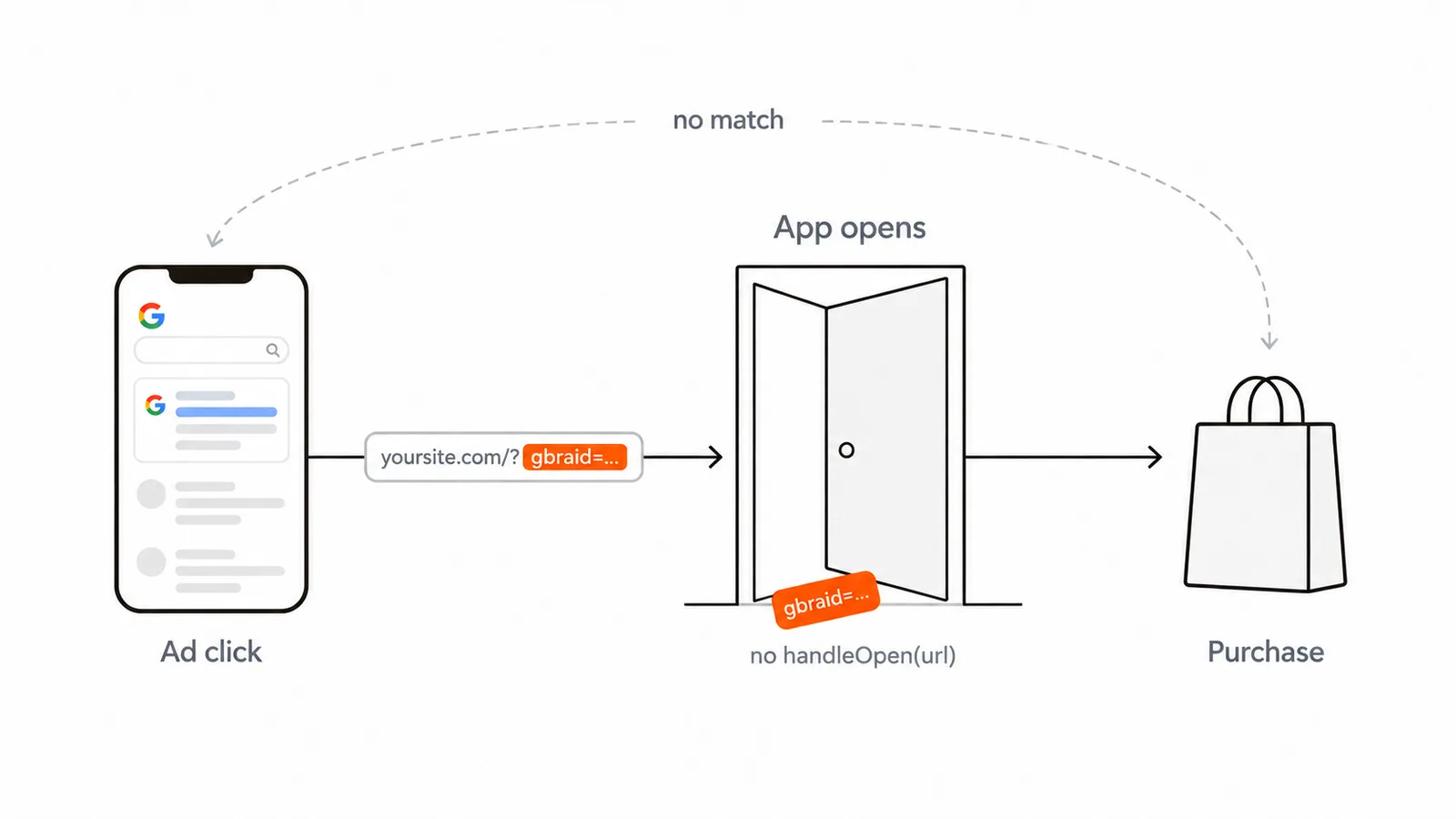
That is why the failure is iOS-only, why it affects both your Firebase and MMP conversion actions at once, and why it can appear out of nowhere when an app migrates to SwiftUI or a scene-based lifecycle.
The fix
1. Hand the opening URL to Firebase (the primary fix)
One call, in every place iOS hands your app a URL:
SwiftUI:
import FirebaseAnalytics

.onOpenURL { url in
    Analytics.handleOpen(url)
}
UIScene delegate:
// scene(_:openURLContexts:)  and  scene(_:continue:) for Universal Links
Analytics.handleOpen(url)
Objective-C:
@import FirebaseAnalytics;
[FIRAnalytics handleOpenURL:url];
Cover all entry points: custom URL schemes, Universal Links, and the continue-user-activity path. The gbraid can arrive through any of them, and the one you skip is the one your traffic uses.
Minimum Firebase iOS SDK: 6.32.2. If your app predates it, the SDK bump is part of the fix.
2. Make sure the URL actually reaches that handler, parameters intact
Analytics.handleOpen(url) can only extract what arrives. Two things must hold upstream:
- Universal Links are live: the associated-domains entitlement in the app and a valid AASA file on your domain, so the gbraid-tagged landing URL opens the app rather than the browser.
- The query string survives: no redirect in the chain (link shorteners, interstitial pages, deferred deep-link tooling) may strip URL parameters. A redirect that drops the query string kills attribution as surely as the missing handler call.
Test it end to end: click a real tagged URL on an iOS device and log the URL your handler receives. If gbraid= is not in it, work backward through the chain.
3. The prerequisites (verify, do not assume)
Firebase linked to GA4, GA4 linked to Google Ads, the in-app events marked as conversions, the conversion actions imported into Google Ads, and auto-tagging enabled in the Google Ads account. All of these usually exist in a working Android setup, which is exactly why nobody rechecks them. Recheck them.
4. The MMP’s parallel path
If you run the dual stack from part one, your MMP is the Secondary conversion source for Google Ads and should forward gbraid in its server-side postbacks too:
- Update the MMP iOS SDK to a version with native gbraid/wbraid support.
- Confirm Universal Links and deferred deep linking are configured in the MMP SDK so it captures the parameter from the landing URL.
- In the MMP’s Google Ads partner settings, confirm web-to-app measurement is enabled.
Verification, and what to expect
After deploying the fixed build:
- Diagnostics: the gBraid error in Google Ads (Goals, then diagnostics) should clear for the affected conversion actions.
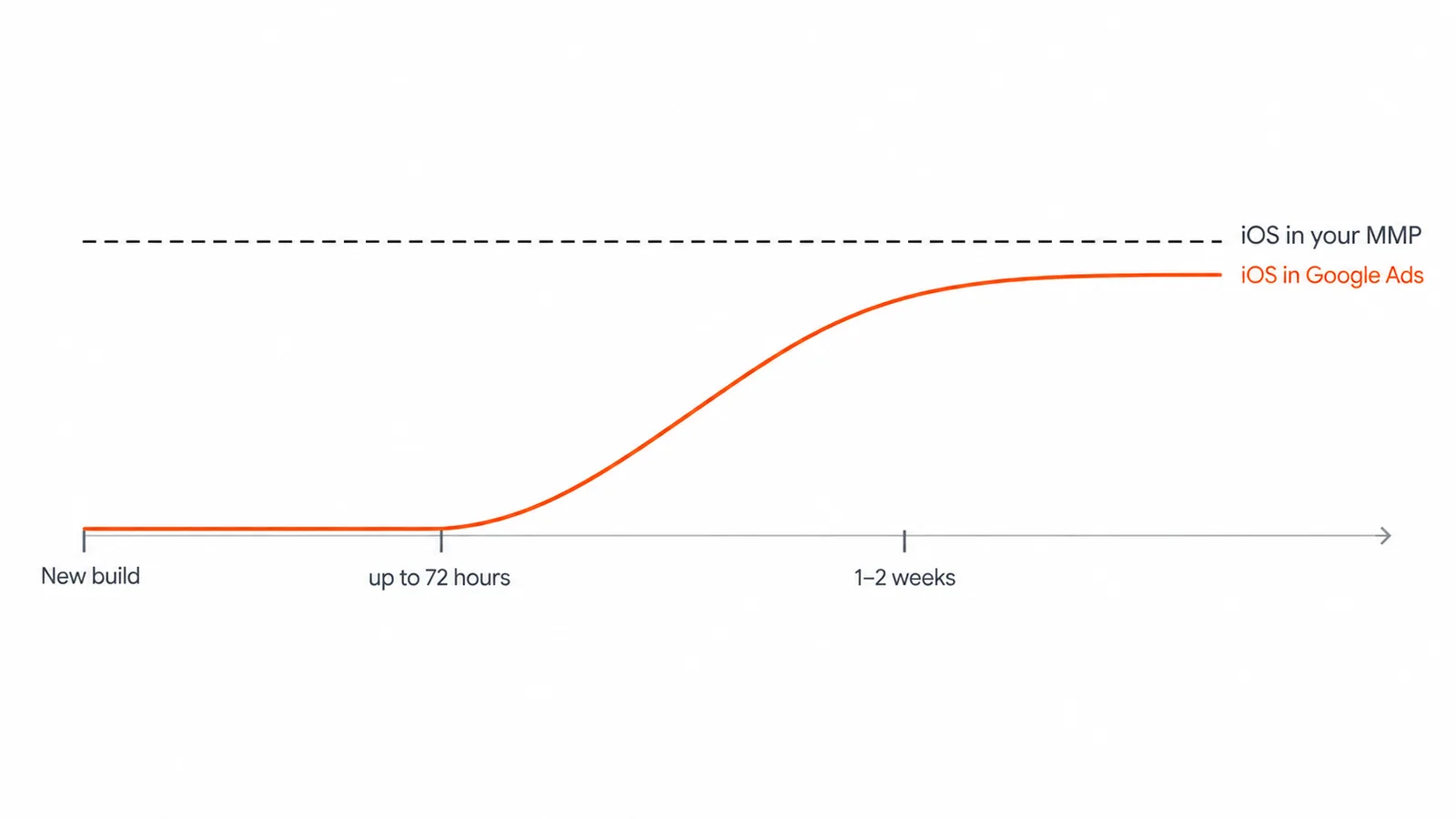
- Latency: gbraid-keyed conversions can take up to 72 hours to process, against under 12 for GCLID. Do not judge the fix the next morning.
- Gradual recovery: this is the part that surprises people. The fix only exists in the updated build, so attribution recovers as your iOS users update the app. Expect one to two weeks before the trend is readable, faster if you prompt updates.
- The success metric: iOS attributed conversions in Google Ads should climb from near zero toward parity with what your MMP says iOS actually produces. In our case that meant the attributed count moving from one toward the Android-like double digits the underlying volume always justified.
Common mistakes
- Rebuilding event tracking to fix an attribution gap. The events were never broken. Confirm data exists before changing what produces it.
- Adding the handler to one URL entry point and missing the others. SwiftUI, scene delegate, and Universal Link continuation are three doors. Cover all three.
- A redirect stripping the query string. Everything downstream is correct and attribution still dies. Test with a real device and a real tagged click.
- Judging the fix after 24 hours. Between 72-hour processing and update-dependent rollout, early silence means nothing.
- Forgetting the MMP path. Google recovers, but your Secondary source stays blind, and your cross-check from part two loses its meaning.
FAQ
How do I know if this affects my app?
Compare iOS versus Android conversions in Google Ads against the same split in your MMP or Firebase. Healthy underlying iOS volume plus near-zero iOS attribution in Google Ads is the signature. The explicit diagnostic (“gBraid conversion measurement setup is incorrect”) confirms it.
Is this the same as SKAdNetwork?
No. SKAN (now AdAttributionKit) is Apple’s separate, aggregate attribution layer for app-install campaigns. gBraid specifically covers Google’s web-to-app measurement for consented-limited environments. A complete iOS setup needs both working; this post covers the gbraid half.
Does this affect Google App Campaigns or only web campaigns?
gBraid applies to journeys that start on the web: Search, Shopping, Display, and Performance Max clicks that end in the app. App Campaign installs are measured through their own path.
We fixed it and iOS is still below Android. Why?
Three legitimate reasons: not all users have updated the app yet, gbraid processing runs up to 72 hours, and some iOS journeys remain unmeasurable by design under ATT. The target is the trend toward your MMP’s iOS reality, not day-one parity.
Can I fix this without an app release?
No. The missing call lives in the app binary. That is also why the recovery is gradual: the fix ships with the build, and attribution returns user by user as they update.
Key takeaways
- iOS-zero with healthy Android is almost always attribution, not data. Prove the conversions exist in your MMP before touching anything.
- The root cause is one missing call: hand every opening URL to Firebase with
Analytics.handleOpen(url), on SDK 6.32.2+, in all URL entry points. - The parameter must survive the journey: Universal Links live, AASA valid, no redirect stripping the query string.
- Fix the MMP’s gbraid forwarding too, or your Secondary source stays blind.
- Recovery is build-dependent and gradual. Give it two weeks and measure against your MMP’s iOS volume, not against hope.
This closes the app-tracking series: the architecture, the silent failures, and the iOS gap. If you want all three checked against your stack in one pass, that is exactly what my app tracking audit covers.
Sources: Google Ads Help, set up gBraid conversion measurement for iOS; Google Ads Help, iOS 14 campaign measurement updates; first-party diagnosis and fix on a production iOS app for a Swiss booking marketplace (June 2026).